momgineer: homeschooling
Showing posts with label homeschooling. Show all posts

20+ Awesome Games for At Home Learning

Our Favorite Educational Games

Games are one of my favorite ways to learn and reinforce skills with kids. My own kids, especially when younger, wanted to play game after game. Why not play games that aid in education?

For convenience, I have added links to all of commercially-produced games in one location! You can browse for them here:

https://www.amazon.com/shop/momgineer?listId=CEO2PQSKZVSI
Disclaimer: I may earn a small commission for my endorsement, recommendation, testimonial, and/or link to any products or services from this website. Your purchase helps support my work in bringing you downloads of value and information about educational resources. The link below is an Amazon affiliate link. You can read my full disclosure here.

Print-at-Home games are listed at the end of this post.

https://www.amazon.com/shop/momgineer?listId=CEO2PQSKZVSI

Math Skills

You can turn ANY game that uses dice or spinners for game advancement into a math-centric game by simply adding more dice. If you've ever played Chutes and Ladders, you know the game can go on ...and on. Solve this problem and make it more exciting. Instead of using the spinner, use dice (lots of them). It will take a few tries but eventually your kids will be adding up the numbers on dice faster than you can!

Yahtzee is one of the best games to play with multiple dice. I made a set of scorecards you can use while playing with 10 dice that you are welcome to try out (scroll to end of post for link).

Math Card Games: Rat a Tat Cat, Sleeping Queens, Frog Juice, Zeus on the Loose These are all games for early math learning from Gamewright. They work in addition, rounding, and basic number sense. Fair warning - reading the instructions for some of these the first time can feel overwhelming but the games are really not difficult. I suggest the play and read approach - play a bit as you read the directions, or find a YouTube video that explains the play.

Sumoku or Math Dice (intermediate): For Sumoku, you create a grid much like you would in Qwirkle (see below), but instead of shapes, there are numbers, and each row must sum to a multiple of a specific number. If it sounds complicated, well, it can be. However, it's also a TON of fun if you have math-minded kiddos. Math dice is another one where you will only want to play if your kids won't get frustrated by the math involved.

Equate (advanced learners only): If you have a kid that LOVES math, this is the game for them. If math is a struggle, avoid this game as it's quite a taxing one mentally (even for those who love it!).

24! If you haven't played this game before, it's simple to learn but challenging to master. All you need is a sharp mind and a deck of cards! Find the rules here.
 
https://www.amazon.com/shop/momgineer?listId=CEO2PQSKZVSI

Logic, STEM, and more

Qwirkle and Rummikub are both great for logic and pattern recognition! For Qwirkle, watch a video on how to get started but you are basically looking to match either color or pattern (with no repeats in a given row or column). Completing a set of 6 earns you a Qwirkle for bonus points! Rummikub is another tile game that is even easier to learn, but much more difficult to master. You need to keep a constant eye on the board and awareness of your current tiles.

Or pick one of these: Gravity Maze, Laser Maze, Rush Hour Traffic Jam, Solitaire Chess, Sequence The first four of these games are all ones that can be played independently, from Thinkfun. They have tasks of increasing difficulty and provide solutions for self-checking. Sequence has a variety of options to choose from, so be sure to check out all the options to find an appropriate set for your family.

Advanced Learners: Set. This is a game that can be frustrating for kids who aren't ready, but once they are ready, there is no upper age limit on this game. It's one I truly love playing with my kids! There is also a junior version available! You can also play a version of this game online every day at the New York Times Crossword Puzzle site (just scroll down and select "Set")!

Robot Turtles A great precursor to coding game, this is a fun one to check out with your kids! It's also from Thinkfun.

Valence
and Ion (science): these are for upper elementary and middle school kiddos. If you have kids with an inkling toward Chemistry, these are sure to delight!

https://www.amazon.com/shop/momgineer?listId=CEO2PQSKZVSI

Geography

The Scrambled States of America Game This game helped my kids learn all the names of the states!

Ticket to Ride (multiple versions): This is a very popular game among board game enthusiasts and probably one of the longest games to play on this list. If you love board games, you have to try this one!


Flag Frenzy Kids will gain awareness of different flags wiht this matching game.

Apps to Try: Stack the States and Seterra (also their website is great for practicing geography skills) - check out the App Store or Google Play for these!

Literacy Skills

While traditionalists like myself will enjoy playing games such as Boggle, Scrabble, and Bananagrams, they aren't for everyone. If you do have those games but they aren't quite right for your kids, use the tiles to spell out words together that you find around the house, or create a "crossword" with the tiles, building words together of things they love (sports, food, activities, etc.)!

Engage reluctant writers with Rory's Story Cubes. This is less of a game and more of a story generator.

Practice sight words and more literacy skills with Pair Stare (see below).

https://www.amazon.com/shop/momgineer?listId=CEO2PQSKZVSI

Just for Toddlers and Preschoolers!

Toddlers don't have to miss out on games! Some of my favorite games for little ones are cooperative games like Busytown and Hoot Owl Hoot.

Other games for this age

Pengaloo A game that challenges memory and reinforces color awareness! I love the feel of this game, its wooden piece are very satisfying to play with!

Uno Moo A simple game of matching that is also just so fun to play! This one never gets old.

The Sneaky, Snacky Squirrel Perfect for color learning, memory, and more!


https://www.teacherspayteachers.com/Store/Meredith-Anderson-Momgineer/Category/Games-30529


Print at Home Games

I have created a number of print-at-home learning games for elementary and middle school learners:

Free Games:
Crazy Yahtzy
Pair Stare Sample
Nature Bingo

Other Games:
Pair Stare Games
Alphabet Game

Sight Words Games: Fry Sight Words or Dolch Sight Words
Blends Games
Math Games
Vocabulary Synonyms Game
Greek and Latin Roots Games: Set 1 and Set 2

Money Games
Money Games Bundle
Gnome or Money a silly and punny coin game (No More Money)

Economics
Barter, Trade, Create!

Math and Number Systems
Mayan Number Games
Multiplication War

Pin these ideas for later:


Pair Stare for Blends!

Practicing Blends with a Fun Game

Who doesn't love a fun game? My favorite way to engage learners of all ages is through play, and this game is fun for kids and adults alike! Over the years I have developed a number of these games, and now there is a set of pair stare games for blends!


If you aren't familiar with pair stare, you may want to visit this pair stare post. However, you can get an idea of how it's played by watching the video below:


You can try it out in the image below. Look at the top two cards. Do you see the one and only image or word that is on BOTH cards? Once you find it, do the same with the bottom two cards! 

Why is this game so much fun? No matter how often you play, the game is always slightly different. You can try playing with the cards below. Pick two cards and then look at them until you find the match. It's harder than it seems! Sometimes you think there must not be a match...but I promise you there is. A few things that can help you out:

  • If it's a word or blend, it will always be the same color and font
  • the match will NOT always be the same size
Did you find the answer to the image above?


This game is always different, because when you shuffle the cards, there is a new match! ANY two cards in the deck have one unique match. With over 55 possibilities, it's harder than it initially sounds!

The game also has both words and images, as well as the blends! The words have been carefully selected as easier to read, as you can see above with words like brag, from, and free, while more complicated words that students would not yet be able to read are displayed in image form, such as trampoline, broccoli, and dragon.

L Blends, R Blends, and S Blends

You can find all three blends games in my TpT shop:
https://www.teacherspayteachers.com/Product/Blends-Games-Pair-Stare-BUNDLE-L-Blends-R-Blends-and-S-Blends-4354818?utm_source=Momgineer%20Blog&utm_campaign=Pair%20Stare%20BLENDS

Or save these ideas for later on Pinterest:

Demystifying STEM with SOLIDWORKS Apps for Kids


Demystifying STEM with SOLIDWORKS Apps for Kids

Let’s face it: sometimes, getting kids into STEM is hard. You can preach the gospel of science, technology, engineering, and math all day long, but if a kid feels like their creativity and imagination are being stifled by rules and numbers, “STEM” can quickly turn into “STOP.” SOLIDWORKS Apps for Kids was created with this in mind.
SOLIDWORKS Apps for Kids is an ecosystem of apps meant to nurture new designers from age 4 and up. With Capture It, Shape It, Mech It, Style It, and Print It apps, kids are introduced to real-world workflow practices like ideation, creation, enhancement, and production in a fun and accessible way. The apps empower kids to learn while allowing their creativity to flow, giving them multiple methods to design and turn their craziest ideas into reality.

Meet the Apps 

http://www.solidworks.com/a4k_momgineerblog

Capture It is a personal inspiration app, where kids can add photos, draw their own images and turn them into stickers, and create an idea board for all the designs that will come next.

Anyone who is familiar with 3D modeling will recognize Shape It, a kid-friendly, easy to use CAD app that allows kids to shape, prod, and pull material into their very own creations.

http://www.solidworks.com/a4k_momgineerblog
Two kids might create similar models, but with the Style It app they can really make their own designs pop. Kids can transfer models from Shape It to Style It and use colors, stickers, backgrounds, and more to decorate and make their model truly unique. Create a cute and happy spider or your own Mars rover.

With the Print It app, kids can watch their designs come to life. Print It gives kids the ability to 2D print or 3D print their designs, and also allows them to learn about isometric views in a cool way with the Cube Print function. Keep reading to see an example of the Cube Print function.

Is your child more interested in motors and linkages? With the Mech It app, moving machinery is in within arm’s reach, with cool and colorful spiral designs that kids can tweak in any which way they like.
http://www.solidworks.com/a4k_momgineerblog


Mech It was definitely my favorite app to try out! Join a few bars together, add a motor, and then hit play to watch it go! You can even slow it down and speed it up with the slider bar. Here is a simple crank-rocker mechanism I created:


Pro Tips to Get Started Successfully with SOLIDWORKS Apps for Kids

1) Start with the Videos

When you try out the apps, make sure you start with the videos! They are short but all very helpful so that you can get started right away and learn what all the different options are for drawing, styling, and modifying designs. Especially for kids new to CAD, this is SO helpful! Just click the ? in the upper right corner of the screen at SOLIDWORKS Appsfor Kids to find all the videos to get started on the right track.

2) Utilize the Public Projects

Navigate to the public projects, find one you like, then click on the copy icon to "Riff."


3) Start tinkering!

Dive right in and start tinkering with whichever app appeals to you most!

4) Remember to Print it

One way for kids to show what they created is to print it. You can create 2D prints on paper, with or without a background, on a 6-sided cube, and in color by number style (what?!!! This is so awesome!). You can even 3D print your kids' creations. I constantly get asked for project ideas for 3D printing. These apps have got you covered; design, go to print it, and grab your STL file. Explore the Print It app and never run out of ideas for your 3D printer.

http://www.solidworks.com/a4k_momgineerblog

Internet Safety and Privacy


Projects in SOLIDWORKS Apps for Kids are always private until you decide to share to the Apps for Kids Public Gallery. Users can “riff” on public projects—your kid might see a cutesy bunny design, like it, then riff on that project and transform that bunny into an out of this world alien. Creativity, imagination, and community are all part of the Apps for Kids ecosystem.

STEM Block, Tech Lab, or Makerspace

Educators across the country have embraced SOLIDWORKS Apps for Kids as a means to teach their students about design and engineering. Now, the Apps for Kids Classroom interface allows teachers to create and organize self-contained workshops.

http://www.solidworks.com/a4k_momgineerblog

Use at Home Together

Parents, do not deprive yourself of the opportunity to create something magical and fun with your child. Work together to create a robot army, an enchanted land, or a space adventure!

While there are dozens of apps out there that may enhance STEM learning, these apps are truly a complete suite of apps. There is something for everyone, whether your students lean more toward revising and enhancing designs or creating something brand new from scratch.
If you give kids the means to express and create, to engineer and tinker to their heart’s content, they can learn that STEM exists beyond numbers and rules. With SOLIDWORKS Apps for Kids, they are already there. Learn more about all the fun things you can do with SOLIDWORKS Apps for Kids right here.

Pin These Ideas for Later


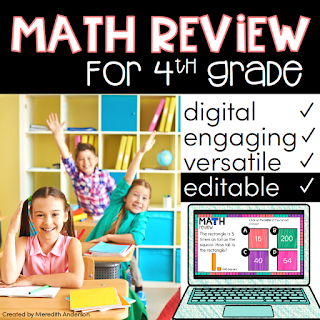
Digital Math Activities for 4th Grade

4th Grade Math Test Prep and Review for Google Classroom


I may be married to STEM, but math and I are BFFs. If you feel the same way about math, high five my friend. If math and you aren't really besties, or your students groan when you start talking about fractions, I have something that will make math just a wee bit more enjoyable in your digital classroom.


Digital math? Hmm, how does that work?

Though I have been creating resources for the digital classroom for years, it's always been more straightforward to create and use text-heavy styles as opposed to entering numbers or creating math exercises. Math, in my opinion, will always need pencil and paper at least some of the time. For this reason I have held off creating too many digital math resources because nothing "felt right."

Where digital and math DO seem to have common ground is in a review format (as well as instructional, but that's a topic for another time). For initial practice, I recommend sticking with pencil and paper. Once students have a reasonable level of mastery, digital review formats are AWESOME!

  • Digital formats engage students. 
  • Digital practice is imperative if your state testing is computer-based.
  • Flexibility to customize math practice for students is useful for student learning and teacher tracking.

State Testing in the 21st Century

Sometimes you HAVE to practice math on a screen. As more and more states more to online testing, it's important to get practice both with pencil and paper, and in a digital format. That's why in addition to having CCSS-aligned digital math practice, I have created this as an editable resource.


Did you say EDITABLE?

Yes! You can add as many new problems as you like. I even created a video guide to walk you through it in my downloadable resource. Another great feature is that these are self-checking so they can be used independently.

Watch the Video  Overview


Get Digital Math Practice for Google Classroom

Click to get this digital math review resource.When you download it, you will have over 65 problems to get started on right away, with the option to add as many additional problems as you'd like.

https://www.teacherspayteachers.com/Product/4th-Grade-Math-for-Google-Classroom-Digital-EDITABLE-Fractions-Place-Value-3604927?utm_source=Momgineer%20Blog&utm_campaign=Digital%20Math%204th%20Grade


4th Grade Math for Google Classroom - Editable Digital Math that is perfect for review and test prep. | Meredith Anderson - Momgineer


Gingerbread STEM Activities - Classroom Appropriate for the Holidays

Gingerbread Man Activities and STEM Challenges

Do you love the holidays but aren't sure how to bring a learning experience into a fun topic? One way to celebrate the season is with all things gingerbread! Even though I have a soft spot in my heart for the jolly bearded fella, I know it's not always easy to use certain themes in the classroom.


Do you have fond childhood memories of books where you got to choose what happened? I know I do. I would go back and read through all the possible endings just to make sure I got the best one (admit it, you did too).

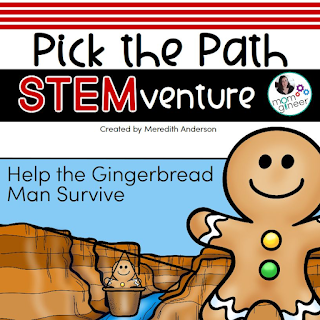
I was thinking how FUN and ENGAGING it would be to alter a classic tale and let students choose how it unfolds? This STEM adventure starts with the story of the gingerbread man and turns it into a Pick the Path STEMventure activity. The gingerbread man meets a fox...will he survive? That depends on your students' choices (**spoiler alert** - the gingerbread man always survives, but they won't know that while choosing their adventure):

In this short storybook, the gingerbread man may need a zip line transport across a canyon, or he could need a tent for the night to stay alive. Here is a gingerbread man crossing a river to get away from the fox:
When the story is complete there are even a couple of bonus STEM challenges to complete. The gingerbread man finds himself among more gingerbread people and is so excited to have finally found a safe place where he won't be eaten. The gingerbread people decide they want to pursue the circus life. What gingerbread man wouldn't want to get launched from a catapult or slingshot? Move over, Cirque du Soleil...

The easy to follow booklet includes the engineering design process.

All your students have to do is follow the story, fill in the pages for the challenges they pick, and continue on with the story. This is even a great activity to send home over winter break if you know families will get involved. Click the image below to go directly to the resource on Teachers pay Teachers (or on my site here):

https://www.teacherspayteachers.com/Product/Gingerbread-Man-STEM-Activites-Pick-the-Path-3509634


Pin these ideas for later:

https://www.teacherspayteachers.com/Product/Gingerbread-Man-STEM-Activites-Pick-the-Path-3509634

I need more gingerbread it my life. Read on, my friend.

My teacher friend Amy and I were chatting about all things gingerbread. Do you know Amy? Her forte is social studies and writing.You are going to LOVE these gingerbread resources she put together. You can head over to her blog, Teaching Ideas 4U, to find out more about them. Two I know you'll love are this non-fiction gingerbread book report and this writing resource for character development:

https://www.teacherspayteachers.com/Product/Gingerbread-House-Non-fiction-Craftivity-Book-Report-Project-Use-With-Any-Book-1565864?aref=ztzbh5ve&utm_source=Momgineer%20Blog&utm_campaign=Gingerbread%20Non%20Fiction%20Book%20Report%20and%20Craftivity


It wouldn't be a gingerbread post without some recipe links! Here are some to try out, depending on what floats your boat. Do you like cookies? To build gingerbread houses? Do you like your gingerbread spicy, crunchy, or chewy?

Gingerbread Recipe Links
Genius Kitchen Gingerbread Cookies
King Arthur Flour Gingerbread Cookies
Eileen's Spicy Gingerbread Men Recipe
Spiced Gingerbread Cookies
Gingerbread House Recipe

Top 3 Fun Halloween STEM Activities for Kids

Halloween STEM Builds!

Do you love doing holiday-themed building challenges? Use building bricks in 2D designs for younger kids, or 3D for kids who are expert builders. Here are some fun ideas to get started for Halloween:


What do you think of first with Halloween? I know one of my kids' favorite traditions is carving their jack-o-lanterns.


It is trickier than it seems to get the expression right, so it's a great one to work on with persistence. The above jack-o-lanterns are what I mean by 2D. They aren't really 2D but they are flat. Creating a spherical shape with bricks is far more challenging and should only be attempted if you have expert builders. Also, orange bricks aren't always easy to come by, but remind your kids of white pumpkins! I have grown these in my garden before and they are quite striking.

If you are thinking you need an easier challenge, try a spider:


Maybe the spider has 8 legs of different length, or is red. It might not even look that much like a spider when it's done, which is okay! It's all about exploring with space and building, finding the pieces to make it "just right."

Some kids do well with a defined challenge, such as the two above, but others really soar when the challenge is open-ended. Design and create a creature! Some kids will stick with a traditional Halloween creature, like a bat or a cat. Others might be into zombies or skeletons or vampires. Why not? Let them see what they can come up with:


If you are looking to make this a more educational activity, I have developed a set of STEM mats with design criteria. Students will measure their creations, count bricks, and build according to the mats.
https://www.teacherspayteachers.com/Product/Halloween-STEM-Center-for-Building-Bricks-STEM-Mats-3378648?utm_source=Momgineer%20Blog&utm_campaign=Halloween%20STEM%20Mats


Or, pin the image to save it for later:


What are STEM Mats? Watch the video to find out, and get a sample STEM mat to try it out.


Pair Stare Games for Sight Words, Mathematics, and Visual Discrimination

Pair Stare Games: Fun with Sight Words  (and more!)


A game where kids and adults are on a level playing field: meet Pair Stare! Pair stare is not only a game where kids can practice their sight words (and other skills), but they can use visual discrimination skills to find where the pair is on two cards. Choose any two cards and find the one and only match on both of those cards. Watch a quick video to see a few ways to play:


Why is this game so much fun? No matter how often you play, the game is always slightly different. You can try playing with the cards below. Pick two cards and then look at them until you find the match. It's harder than it seems! Sometimes you think there must not be a match...but I promise you there is. A few things that can help you out:
  • the word will always be the same color and font
  • the word will NOT always be the same size
  • if you can't find the word, try searching by color or by number of letters in the word. Try it out below! Pick ANY two cards below and then find the match.

After you have found the match, record it and move on to a new set of cards.
There are decks for varying degrees of sight word difficulty, each with a slightly different color scheme or font, and all coded lightly at the bottom corner of each card. That means that you can use the same game but alternate decks as your students become more confident in their site words.

Pair Stare Isn't Just for New Readers


In addition to the fraction and math games (addition and subtraction), I have created a slightly different pair stare vocabulary game for upper elementary and even middle school students. The word isn't the same on both cards, but rather you need to find a synonym. Luckily all the matching synonyms are still color-coded. Can you find any below? Find sizzling/sweltering, walk/meander, or miniscule/small!


Good news. You can try out a basic set for free here:
https://www.teacherspayteachers.com/Product/Sight-Words-Game-FREE-1000055?utm_source=Momgineer&utm_campaign=Pair%20Stare%20Post

or you can find all my pair stare games at Teachers pay Teachers.


Pin this idea for later:


There is now an editable version of this game! Grab the editable spelling and vocabulary word game here. Add any spelling list, vocabulary list, or themed list to create your own deck of cards: